Monday, 23 March 2015

MVC routing

MVC routing

MVC routing is the URL is mapped to controller and controller is mapped to any action type.
Suppose there is the control name customer where the action is  DisplayCustomer and you are checking in the local host than the URL will form as  http://localhost/ customer/ DisplayCustomer
Now lets see where the Routing configuration defined for MVC project.
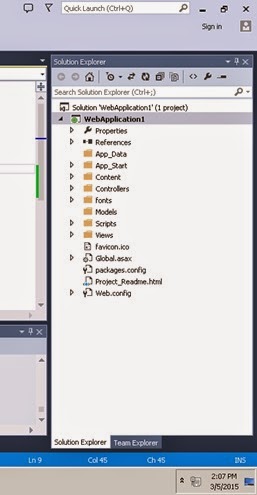
You can see the below folder structure for Your MVC project and on it there is a file RouteConfig.cs


Friday, 20 March 2015

c# hashtable vs dictionary

Hashtable and Dictionary both of them are used to maintain the key, value pair only there is some basic difference that makes us to opt, any of this 2 based on the situations.

Differences  between Hashtable and Dictionary.

1.       Declaration of Hashtable and dictionary;
Dictionary:
Dictionary<int, string> dict = new Dictionary<int, string>();

Hashtable :
Hashtable hst = new Hashtable();

convert list to string c#

There are many ways you will do convert list to string c# from google. But what you will adopt, which is good in terms of line and in terms of complexity.

 I will demonstrate three ways to convert list to string c# with “,” seperated  and you will see that which one is taking less time in execution.
Suppose you have list of sting, that you can form like below code; Having 1Lakhs of string records


Thursday, 5 March 2015

mvc pass model into view

Just create the simple MVC Application and you have structure Like Below screen;


Now you can see that we don’t have Models file in the structure. Now Create a Department class and the model which will have 3 Entity :

showing viewdata in MVC 5 on razor view

In MVC Viewdata is the way to maintain the data for passing it  from Controller to View.

Just giving the below example to pass the ViewData in MVC5 on Razor View;

You have defined or pass the Viewdata from controller like below;

public class HomeController : Controller
    {
        //
        // GET: /Home/
        public ActionResult Index()
        {
            return View();
        }

        public ActionResult MyHomeview()
        {
            ViewData["Datetime"] = DateTime.Now.ToString();
            return View();
        }
       }

Saturday, 28 February 2015

read json in c#

Reading the JSON file passing from Jscript file and read that in C# Code

Suppose you are creating the JSON file like below;

function GetInsertedData() {
    var CustomerDetailsModels = {
        CustomerDetailId: $("#hdnId").val(),
        ClinicName: $("#txtClinicName").val(),
       PhoneNumber: $("#txtPhoneNumber").val(),
        UserName: $("#txtUserName").val(),
        Password: $("#txtPassword").val(),
        // DateOfRegistration: $("#DateOfRegistration").val(),
        ValidaityDate: $("#txtValidaityDate").val(),
        ActiveDate: $("#txtDateOfActivation").val(),
        Address1: $("#txtAddress1").val(),

        Address2: $("#txtAddress2").val(),
        CountryId: $("#ddlSelecteCountry").val(),
        StateId: $("#ddlSelectState").val(),
        DisctrictId: $("#ddlDistrict").val(),
        PinCode: $("#txtPincode").val(),
        EmailId: $("#txtEmailID").val(),
        Website: $("#txtWebsite").val(),
        OfficeNumber: $("#txtOfficeNumber").val(),
        NumberOfUser: $("#ddlAllowedNumberUser").val(),
        IsActive: $("#chkISActive").val(),
        IsPaid: $("#chkISPaid").val(),
        AmountPaid: $("#txtPaidAmount").val()

how to read class property name in c#

Dynamically retrieve and save property name and value into the database That can be possible if you are able to read the class property dynamically, and later on retrieve it from the database and invoke the property values

If you have already get work done that how to save the property name in the database, then use Get Property is the way to go on the retrieval of property.

Use Gettype to get the class types. 

Saturday, 20 December 2014

Generate pdf using rdlc c#


In this article I will demonstrate you how to create rdlc report in asp.net.

Microsoft made it very simple to generate PDF by using the “Microsoft.ReportViewer.WebForms”
Take the reference of Microsoft.ReportViewer.WebForms to work with RDLC. It will appear in your reference folder like below;

clip_image001

Thursday, 18 December 2014

Convert number to words c# code


In many applications you need to convert numbers into words like in bank statement invoice or converting the currency values into words.
Below application will really help you to convert the numbers into words.
You just need to pass the numbers like; “23456” it will convert Twenty Three Thousands Four Hundred Fifty Six.

Application will support till the lakhs if you want to extend it you can extend till what you need.


Friday, 12 December 2014

stylecop visual studio


A simple design page : When inserting the Name checking the text value


image

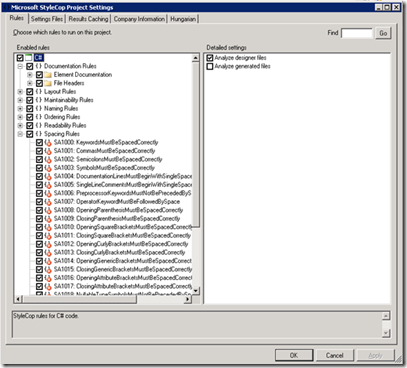
Setting of Style Cop Rules and Properties

image


Rule Selection

a) Click on the check box to check or uncheck the rules to apply for code analysis, By default it is checked for all rules
image

Company Information

image

Run the style Cop to check the code analysis

Either from Toolsà Run the Style Cop

Or Right click on project explorer à Run the Style Cop

image


When you run it it will give the Warnings if it will break the rules.

image

On Running the Style Cop

image

Output Code snippet

After rectifying all the warning by Style cop getting result Violation count : 0

image

Exclude the Particular File from Style Cope

image

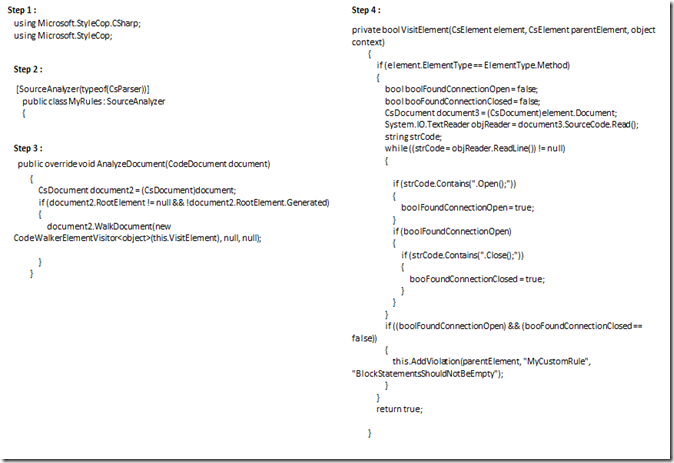
Creating Custom Rule

Steps to Creating Custom rule

1> Creating One Class Library file

2> Import the two DLL and reference it to project

using Microsoft.StyleCop.CSharp;

using Microsoft.StyleCop;

From C:\Program Files\Microsoft StyleCop 4.4.0.14

3> Add one XML File for configuration

4> Successfully Build the code in Release mode

5> Place the DLL into

C:\Program Files\Microsoft StyleCop 4.4.0.14

Code Snippet for Custom Rule to Check Data Base is Closed or Not “.CS file”
image

XML Code Snippet

image

Get the Custom Style Cop Rule into project

image

Custom Warning

image